
Activity 3.5.1.
Try the following code. Add a print() method in the Person class that prints out all the attributes (name, email, phonenumber) of a person object.
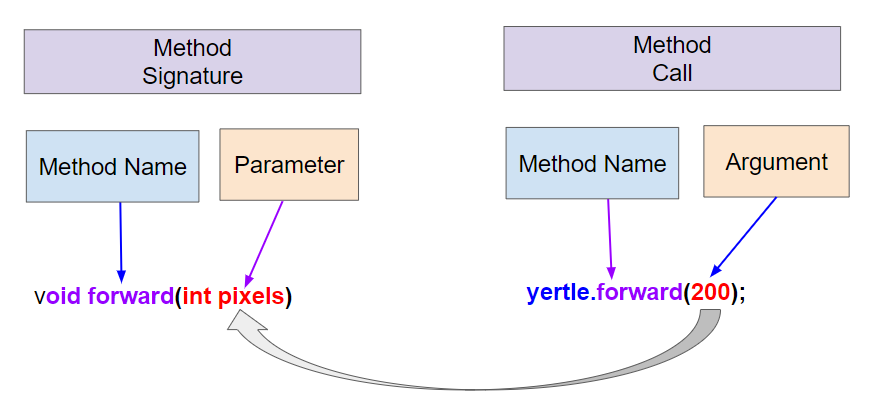
Turtle objects and called methods like forward which changed the x and y coordinates (instance variables) of the turtle. We also defined static methods that did not work with objects. In this unit, we will learn how to write our own methods in our own classes.
public class Person
{
    // instance variables
    private String name;
    private String email;

    // Method definition: uses instance variables name and email
    public void print()
    {
        System.out.println("Name: " + name);
        System.out.println("Email: " + email);
    }

    public static void main(String[] args)
    {
        Person p = new Person();
        p.print();  // Method call
    }
}
// Step 1: declare an object in main or from outside the class
Classname objectName = new Classname();
// Step 2: call the object's method
objectName.methodName(); //Step 2
// Step 3: Define the method in the class
// method header
public void methodName()
{
      // method body for the code
}
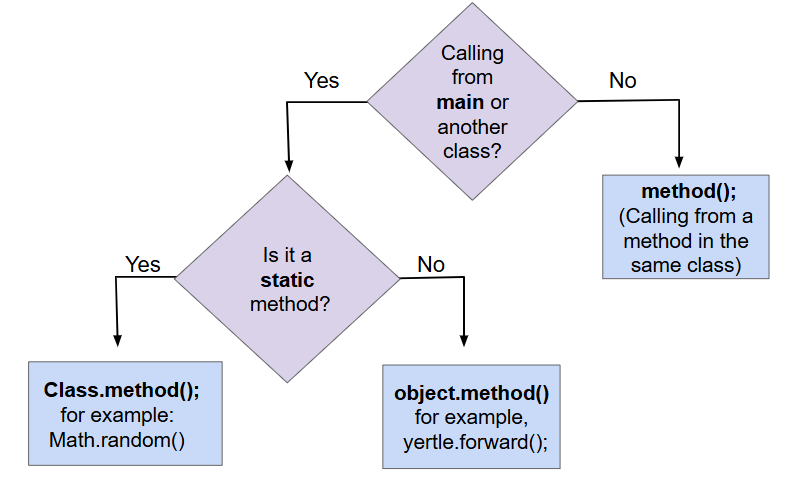
object.methodName(). If you are calling the method from within the same class, you can just call the method using methodName() which will refer to the current object.
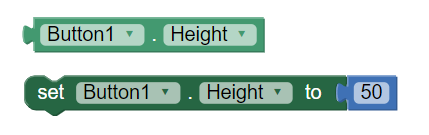
public void methodName()
{
    // method body
}
print method above is a void method. It does not return a value, but it does print out the name and email of the person. In the sections below, we will learn about setter methods that are also void methods.
void. The method header for a non-void method looks like this:
public returnType methodName()
{
    // method body
    return value;
}
getXPos() and getYPos() that returned the x and y coordinates of the turtle. The most common non-void methods in Java are methods that start with get and return the value of an instance variable. We will learn about these in the next section.
return keyword is used to return the flow of control to the point where the method or constructor was called. Any code that is sequentially after a return statement will never be executed, so usually non-void methods end with a return statement. Executing a return statement inside a selection or iteration statement will halt the statement and exit the method or constructor.
int before the method name.
return keyword to return a value at the end of the method.
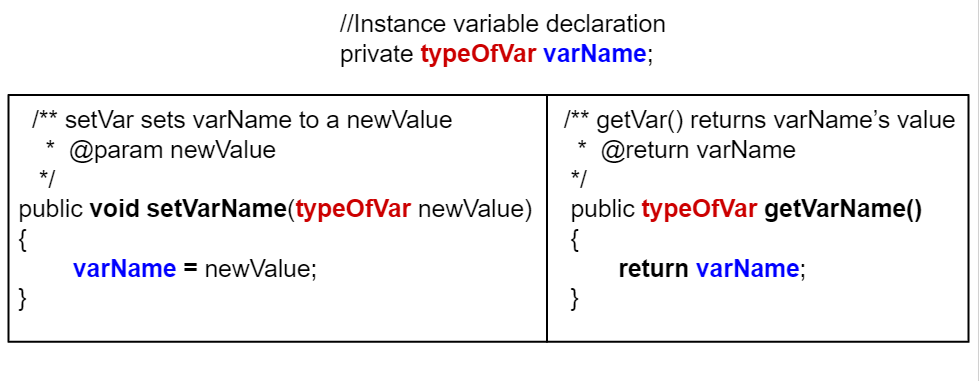
private to the class, if you want code outside the class to be able to access the value of an instance variable, you need to write what is formally called an accessor methods but which everyone actually just calls a getter. A getter is a public method that takes no arguments and returns the value of the private instance variable.
class ExampleTemplate
{

    // Instance variable declaration
    private typeOfVar varName;

    // Accessor (getter) method template
    public typeOfVar getVarName()
    {
        return varName;
    }
}
return statement. We’ll talk more about the return statement in the next lesson, but for now just notice that it is followed by an expression whose value must be the same type as the return type in the method’s header. In a getter, that will definitely be true as long as the type of the instance variable and the return type of the getter are the same.
getName for the Student class which also demonstrates how to call getName using a Student object:
class Student
{

  //Instance variable name
  private String name;

  /** getName() example
   *  @return name */
  public String getName()
  {
     return name;
  }

  public static void main(String[] args)
  {
     // To call a get method, use objectName.getVarName()
     Student s = new Student();
     System.out.println("Name: " + s.getName() );
  }
toString
toString method. This method is called automatically by Java in a number of situations when it needs to convert an object to a String. Most notably the methods System.out.print and System.out.println use it to convert a object argument into a String to be printed and when objects are added to Strings with + and += their String representation comes from calling their toString method.
Student class again, but this time with a toString method. Note that when we call System.out.println(s1) it will automatically call the toString method to get a String representation of the Student object. The toString method will return a String that is then printed out. Watch how the control moves to the toString method and then comes back to main in the Java visualizer by using the Show CodeLens button.
set and that takes a single argument of the same type as the instance variable to be set. The effect of a setter, as you would probably expect, is to assign the provided value to the instance variable.
Turtle class. It provides getters getXPos and getYPos but it does not provide corresponding setters. There are, however, methods that change a Turtle’s position like forward and moveTo. But they do more than just changing the values of instance variables; they also take care of drawing lines on the screen if the pen is down. By not providing setters for those instance variables, the authors of the Turtle class can assume the a Turtle’s position won’t change other than by going through one of the approved movement methods. In general, you shouldn’t write a setter until you find a real reason to do so.
class ExampleTemplate
{
    // Instance variable declaration
    private typeOfVar varName;

    // Setter method template
    public void setVarName(typeOfVar newValue)
    {
        varName = newValue;
    }
}
class Student
{
    // Instance variable name
    private String name;

    /**
     * setName sets name to newName
     *
     * @param newName
     */
    public void setName(String newName)
    {
        name = newName;
    }

    public static void main(String[] args)
    {
        // To call a set method, use objectName.setVar(newValue)
        Student s = new Student();
        s.setName("Ayanna");
    }
}
Student class below which has had some setters added. Notice that there is no setId method even though there is a getId. This is presumably because in the system this class is part of, while it makes sense for a student to change their name or email, their id should never change.
main method is in a separate class TesterClass and does not have access to the private instance variables in the `Student class. Change the main method so that it uses a public setter to change the value instead.
public class Party
{
    // number of people at the party
    private int numOfPeople;

    /* Missing header of set method */
    {
        numOfPeople = people;
    }
}
letter and message to new values in the main method and run it again to try finding a different letter. Then, change the code of the findLetter method to return how many times it finds letter in text, using a new variable called count. How would the return type change?

int, double, and String data types. Make the instance variables private.
main method below, create 2 Pet objects with different values and call the constructor, accessor methods, mutator methods, and toString methods to test all your code.
toString method that returns all the information in the instance variables.
print(format) could print the data according to an argument that is “plain” or “table” where the data is printed in a table drawn with dashes and lines (|). Or come up with another creative method for your class.
void method does not return a value. Its header contains the keyword void before the method name.
void.
return keyword is used to return the flow of control to the point where the method or constructor was called. Any code that is sequentially after a return statement will never be executed. Executing a return statement inside a selection or iteration statement will halt the statement and exit the method or constructor.
toString method is an overridden method that is included in classes to provide a description of a specific object. It generally includes what values are stored in the instance data of the object. If System.out.print or System.out.println is passed an object, that object’s toString method is called, and the returned String is printed. An object’s toString method is also used to get the String representation when concatenating the object to a String with the + operator.
public class Party
{
    private int numOfPeople;

    public Party(int num)
    {
        numOfPeople = num;
    }

    private int getNumOfPeople()
    {
        return numOfPeople;
    }
}
public class Student
{
    private int id;

    public getId()
    {
        return id;
    }
    // Constructor not shown
}
public class Liquid
{
    private int currentTemp;

    public Liquid(int temp)
    {
        currentTemp = temp;
    }

    public void resetTemp()
    {
        currentTemp = newTemp;
    }
}
Party class below, the addPeople method is intended to increase the value of the instance variable numOfPeople by the value of the parameter additionalPeople. The method does not work as intended.
public class Party
{
    private int numOfPeople;

    public Party(int n)
    {
        numOfPeople = n;
    }

    public int addPeople(int additionalPeople) // Line 10
    {
        numOfPeople += additionalPeople; // Line 12
    }
}
addPeople works as intended?

