Section2.6Comparing Boolean Expressions (De Morgan’s Laws)
90 minutes
What if you heard a rumor about a senior at your high school? And then you heard that the rumor wasn’t true - it wasn’t a senior at your high school. Which part of “a senior at your high school” wasn’t true? Maybe they weren’t a senior? Or maybe they didn’t go to your high school? You could write this as a logic statement like below using negation (!) and the and (&&) operator since both parts have to be true for the whole statement to be true. (Thank you to Kevin Saxton from Kent School, CT for this example.)
!(a && b)

a = "senior"
b = "at our high school"

// This means it is not true that (a) it is a senior
// and (b) someone at our high school.
In this lesson, you will learn about De Morgan’s Laws which simplify statements like this. We know that !(a senior at our high school) could mean !(a senior) or !(at our high school). Let’s learn more about De Morgan’s Laws.
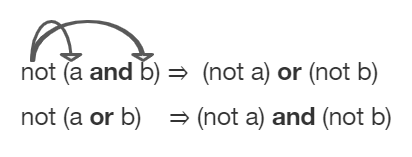
De Morgan’s Laws were developed by Augustus De Morgan in the 1800s. They show how to simplify the negation of a complex boolean expression, which is when there are multiple expressions joined by an and (&&) or or (||), such as (x < 3) && (y > 2). When you negate one of these complex expressions, you can simplify it by flipping the operators and end up with an equivalent expression. De Morgan’s Laws state the following equivalencies. Here’s an easy way to remember De Morgan’s Laws: move the NOT inside, AND becomes OR and move the NOT inside, OR becomes AND.
!(a && b) is equivalent to !a || !b

a = "senior"
b = "at our high school"
You can also simplify negated boolean expressions that have relational operators like <, >, ==. You can move the negation inside the parentheses by flipping the relational operator to its opposite sign. For example, not (c equals d) is the same as saying c does not equal d. An easy way to remember this is To move the NOT, flip the sign. Notice that == becomes !=, but < becomes >=, > becomes <=, <= becomes >, and >= becomes < where the sign is flipped and an equal sign may also be added or removed.
Although you do not have to memorize De Morgan’s Laws for the CSA Exam, you should be able to show that two boolean expressions are equivalent. One way to do this is by using truth tables. For example, we can show that !(a && b) is equivalent to !a || !b by constructing the truth table below and seeing that they give identical results for the 2 expressions (the last 2 columns in the table below are identical!).
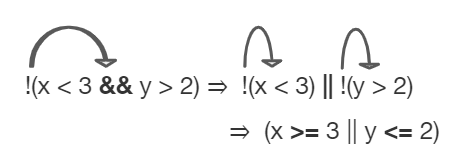
Often, you can simplify boolean expressions to create equivalent expressions. For example, applying De Morgan’s Laws to !(x < 3 && y > 2) yields !(x < 3) || !(y > 2) as seen in the figure below. This can then be simplified further by flipping the relational operators to remove the not. So, !(x < 3) || !(y > 2) is simplified to (x >= 3 || y <= 2) where the relational operators are flipped and the negation is removed. These two simplification steps are seen below.
int x = 4, y = 3;
if (!(x < 3 || y > 2))
{
   System.out.println("first case");
}
else
{
   System.out.println("second case");
}
first case
This will be printed if x is greater or equal to 3 and y is less than or equal to 2. The first part is true but the second is false. Since the statements are joined by an and the complex expression is false.
second case
This will be printed if x is less than 3 or y is greater than 2. In this case the first will be false, but the second true so since the statements are joined with an or the complex expression is true.
int x = 4, y = 3;
if (!(x < 3 && y > 2))
{
   System.out.println("first case");
}
else
{
   System.out.println("second case");
}
first case
This will be printed if x is greater than or equal to 3 or y is less than or equal to 2. In this case x is greater than 3 so the first condition is true.
second case
This will be printed if x is less than 3 and y is greater than 2.
Comparing objects is a little different than comparing primitive typed values like numbers. Objects can be very complex and have many attribute values or instance variables inside them. For example, the Turtle objects have many instance variables like name, width, height, xPos, yPos, etc. When comparing two Turtle objects, we need a specially written equals method to compare all of these values. In the next sections, we will take a look at String objects and the difference between comparing them with == vs. the equals method.
The equals method for Strings compares two strings letter by letter. s1.equals(s2) is true if s1 and s2 have all the same characters in the same order. With Strings and other objects, you almost always use equals instead of == to check their equality.
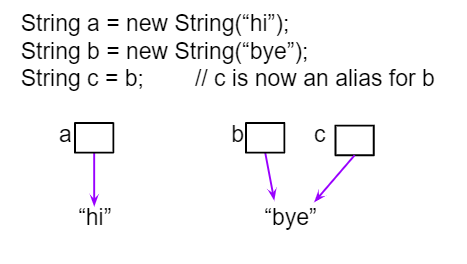
When the operator == or != is used to compare object variables, it returns true when the two variables refer to the same object. These variables are called object references and aliases for the same object. With strings this happens when one string variable is set to another.
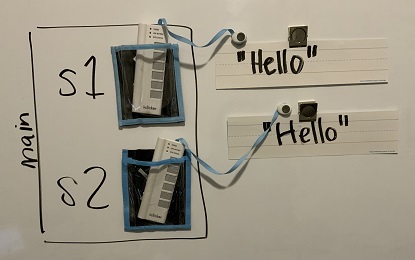
If you use the new keyword to create a string, it will always create a new string object. So, even if we create two string objects with new that contain all the same characters in the same order, they will not refer to the same object.
What will the following print? Run the code to see the difference between == and equals with new Strings that are both “Hello”. Then, write the if statements described below to test the equality of s1 and s3 to see if capitalization matters.
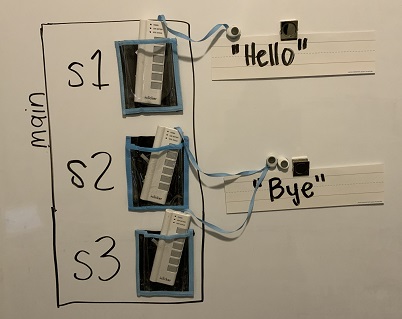
Watch the video below to see how this code works in memory. Since we used the new keyword, two different String objects will be created that each have the characters Hello in them. So s1 == s2 will be false since they don’t refer to the same object, but s1.equals(s2) is true since the two different objects contain the same characters in the same order.
Note that you can also create Strings using string literals instead of new, like String s = "Hello". String literals behave a little differently because they are re-used if they already exist instead of creating a new object. But you should not see questions with string literals and == on the AP exam.
Only use == and != with primitive types like int or to test if two strings (or objects) refer to the same object. Use equals, not == or !=, with strings to test if they are equal letter by letter, and with other objects to see if all of their relevant attributes are equal.
One common place to use == or != with objects is to compare them to null to see if they really exist. Sometimes short-circuit evaluation is used to avoid an error if the object doesn’t exist. Remember that short-circuit evaluation is used with && in Java meaning that if the first part of the if condition is false, it doesn’t even have to check the second condition and it knows the whole && test is false.
Try the following code to see a NullPointerException (if you don’t see the exception because of the autograding, you can copy it into the pencil icon scratch area to run it without the grader). Since s is null, trying to access indexOf on s throws an NullPointerException. Comment out the first if statement and run the program again. The second if statement avoids the error with shortcircuit evaluation. Because s != null is false, the rest of the Boolean expression is not evaluated. Now, change s to set it to "apple" instead of null in the first line and run the code again to see that the if statements can print out that “apple contains an a”.
Subsection2.6.8Coding Challenge : Truth and Tracing Tables POGIL
We encourage you to do this activity as a POGIL (Process Oriented Guided Inquiry Learning) group activity. POGIL groups are self-managed teams of up to 4 students where everyone has a POGIL role and works together to solve the problems, making sure that everyone in the team participates and learns.
Explore the following problems with your group. You may use this worksheet to complete your truth tables. Assume that x is an integer value, for example -1, 0, or 1.
Complete a truth table for the boolean expression: !(x == 0 || x >= 1). Is this the set of positive or negative numbers? Is the expression true when x is positive? Or is it true when x is negative? You can try out the values when x is 1 or -1 or 0. Note that 0 is not positive or negative. You can try running the code below to check your answer.
Complete the following multiple choice exercises in your POGIL groups. Show the application of DeMorgan’s laws or the truth tables in each question on paper.
String Equality: What will the following code print out? Trace through the code by drawing diagrams of what is going on in memory like the figures above, and then show the values of s1, s2, s3, s4 and the output after each line of code. Remember that you can use trace tables to track the values of variables as they change throughout a program. To trace through code, write down a variable in each column in a table and keep track of its value throughout the program as you go through it line by line.
String s1 = null;
String s2 = new String("hi");
String s3 = new String("hi");
String s4 = new String("bye");
if (s1 == null)
{
    s1 = s2;
}
if (s1 == s2)
{
    System.out.println("s1 and s2 refer to the same object");
}
if (s2 == s3)
{
    System.out.println("s2 and s3 refer to the same object");
}
if (s3 == s4)
{
    System.out.println("s3 and s4 refer to the same object");
}
if (s1.equals(s2) && s2.equals(s3))
{
    System.out.println("s1, s2, s3 are equal");
}
Project2.6.15.
Write your tracing table here that keeps track of s1, s2, s3, s4 and the output.
(AP 2.6.A.1) Two Boolean expressions are equivalent if they evaluate to the same value in all cases. Truth tables can be used to prove Boolean expressions are equivalent.
(AP 2.6.B.1) Two different variables can hold references to the same object. Object references can be compared using == and !=. (Two object references are considered aliases when they both reference the same object.)
(AP 2.6.B.3) Classes often define their own equals method, which can be used to specify the criteria for equivalency for two objects of the class. The equivalency of two objects is most often determined using attributes from the two objects.
This lesson ends the section on selection. You can now do the following review and practice lessons at the end of the unit and College Board Progress Check part A in the AP Classroom.