If statements are found in all programming languages as a way to choose between different paths in an algorithm. An if statement is a type of selection statement that changes the sequential execution. It affects the flow of control by executing different segments of code based on the value of a Boolean expression.
If you took an AP CSP course or used a block programming language like Scratch, you’ve probably seen if blocks or statements before. Here’s a comparison of ifs in App Inventor blocks, AP CSP block code and pseudocode, and Java ifs.
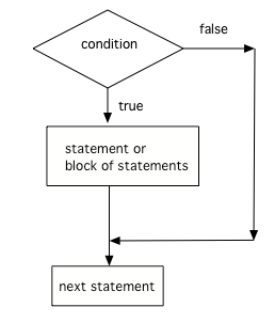
A one-way selection (if statement) is used when there is a segment of code (called the body of the if statement) to execute under a certain condition. In this case, the body is executed only when the Boolean expression is true. If the Boolean expression is false, the body of the if statement is skipped and the program continues with the next statement after the if statement.
The open curly brace { and a close curly brace } are used to group a block of statements together as the body of the if statement. It is recommended to always put in the curly braces even if you have just one statement under the if statement. The questions you will see on the AP exam will use curly braces.
// A single if statement
if (boolean expression)
    Do statement;
// Or a single if with {}
if (boolean expression)
{
   Do statement;
}
// A block if statement: { } required
if (boolean expression)
{
   Do Statement1;
   Do Statement2;
   ...
   Do StatementN;
}
Note2.3.3.
Note that there is no semicolon (;) at the end of the boolean expression in an if statement even if it is the end of that line. The semicolon goes at the end of the whole if statement, often on the next line. Or { } are used to mark the beginning and end of the block of code under the if condition.
Imagine that your cell phone wanted to remind you to take an umbrella if it was currently raining in your area when it detected that you were leaving the house. This type of thing is going to become more common in the future and it is an area of research called Human Computer Interaction (HCI) or Ubiquitous Computing (computers are everywhere).
The variable isRaining is a boolean variable that is either true or false. If it is true then the message Take an umbrella! will be printed and then execution will continue with the next statement which will print Drive carefully. Run the code below to see this.
Run the following active code a couple times until you see all the possible outputs. It prints out whether a random number is positive or equal to 0. Add another if statement that tests if it is a negative number.
A common mistake in if statements is using = instead of == in the condition by mistake. You should always use ==, not =, in the condition of an if statement to test a variable. One equal sign (=) assigns a value to a variable, and two equal signs (==) test if a variable has a certain value.
What if you want to pick between two possibilities? If you are trying to decide between a couple of things to do, you might flip a coin and do one thing if it lands as heads and another if it is tails. In programming, you can use the if keyword followed by a statement or block of statements and then the else keyword also followed by a statement or block of statements.
// A block if/else statement
if (boolean expression)
{
   statement1;
   statement2;
}
else
{
   do other statement;
   and another one;
}
// A single if/else statement
if (boolean expression)
    Do statement;
else
    Do other statement;
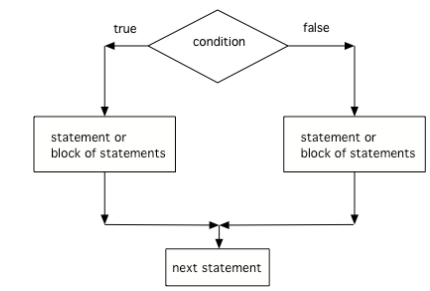
A two-way selection (if-else statement) is used when there are two segments of code—one to be executed when the Boolean expression is true and another segment for when the Boolean expression is false. In this case, the body of the if is executed when the Boolean expression is true, and the body of the else is executed when the Boolean expression is false.
The following flowchart demonstrates that if the condition (the boolean expression) is true, one block of statements is executed, but if the condition is false, a different block of statements inside the else clause is executed.
If/else statements can also be used with relational operators and numbers like below. If your code has an if/else statement, you need to test it with 2 test-cases to make sure that both parts of the code work.
Run the following code to see what it prints out when the variable age is set to the value 16. Change the variable age’s value to 15 and then run it again to see the result of the print statement in the else part. Can you change the if-statement to indicate that you can get a license at age 15 instead of 16? Use 2 test cases for the value of age to test your code to see the results of both print statements.
The following program should print out “x is even” if the remainder of x divided by 2 is 0 and “x is odd” otherwise, but the code is mixed up. Drag the blocks from the left and place them in the correct order on the right. Click on Check Me to see if you are right.
public class EvenOrOdd
{
---
    public static void main(String[] args)
    {

---
        int x = 92;

---
        if (x % 2 == 0)

---
        {
            System.out.println("x is even");
        }

---
        else

---
        {
            System.out.println("x is odd");
        }

---
    }
}
Try the following code. Add an else statement to the if statement that prints out “Good job!” if the score is greater than 9. Change the value of score to test it. Can you change the boolean test to only print out “Good job” if the score is greater than 20?
Always use curly braces ({ and }) to enclose the block of statements under the if condition. Java doesn’t care if you indent the code—it goes by the { }.
Don’t put in a semicolon ; after the first line of the if statement, if (test);. The if statement is a multiline block of code that starts with the if condition and then { the body of the if statement }.
The else statement matches with the closest if statement. If you want to match an else with a different if statement, you need to use curly braces to group the if and else together.
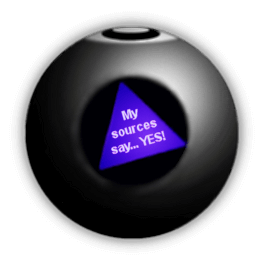
Have you ever seen a Magic 8 ball? You ask it a yes-no question and then shake it to get a random response like Signs point to yes!, Very doubtful, etc. If you’ve never seen a Magic 8 ball, check out this simulator. In the exercise below, come up with 8 responses to yes-no questions. Write a program below that chooses a random number from 1 to 8 and then uses if statements to test the number and print out the associated random response from 1-8. If you need help with random numbers, see the Math lesson and remember the formula (int) (Math.random() * max) + min.
Complete the printRandomResponse() method to print out 1 of 8 random responses and the lucky() method to toss a coin and print out “Lucky!” or “No Luck!” based on the result. Run the code multiple times to see the responses.
You can make this code more interactive by using the Scanner class to have the user ask a question first; you can try your code with input in JuiceMind or replit or a local IDE.
(AP 2.3.A.2) An if statement is a type of selection statement that affects the flow of control by executing different segments of code based on the value of a Boolean expression.
(AP 2.3.A.3) A one-way selection (if statement) is used when there is a segment of code to execute under a certain condition. In this case, the body is executed only when the Boolean expression is true.
if statements test a boolean expression and if it is true, go on to execute the body which is the following statement or block of statements surrounded by curly braces ({}) like below.
// A single if statement
if (boolean expression)
    Do statement;
// A block if statement
if (boolean expression)
{
   Do Statement1;
   Do Statement2;
   ...
   Do StatementN;
}
Relational operators (==, !=, <, >, <=, >=) are used in boolean expressions to compare values and arithmetic expressions.
if (boolean expression)
{
    Do statement;
}
else
{
    Do other statement;
}
(AP 2.3.A.4) A two-way selection (if-else statement) is used when there are two segments of code—one to be executed when the Boolean expression is true and another segment for when the Boolean expression is false. In this case, the body of the if is executed when the Boolean expression is true, and the body of the else is executed when the Boolean expression is false.
Consider the following code segment where a range of “High”, “Middle”, or “Low” is being determined where x is an int and a “High” is 80 and above, a “Middle” is between 50 - 79, and “Low” is below 50.
This would print out both “High” and “Middle”, showing that there is an error in the code. As you will see in the next lesson, one way to fix the code is to add another else in front of the second if.
60
This would correctly print out “Middle”.
50
This would correctly print out “Middle”.
30
This would print out “Low” which is correct according to this problem description.
-10
This would print out “Low” which is correct according to this problem description.