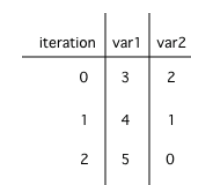
Let’s practice tracing through loops with many variables. Remember to make a tracing table to keep track of all the variables, the iterations, and the output.
Here is a complex loop. See if you can trace the code on paper by making a tracing table to predict what the code will do when you run it. Click on the this Java visualizer link or the Code Lens button to help you step through the code.
Can you trace through this code? Add in output statements System.out.println("var1: " + var1 + " var2: " + var2); before the loop and inside the loop at the end to keep track of the variables and run. Click on the Code Lens button to visualize the code step by step.
int var1 = 0;
int var2 = 2;

while ((var2 != 0) && ((var1 / var2) >= 0))
{
   var1 = var1 + 1;
   var2 = var2 -1;
}
var1 = 1, var2 = 1
The loop stops one of two ways, when var2 = 0 or when var1 / var2 = 0 - neither is true in this case
var1 = 2, var2 = 0
The loop stopped because var2 = 0. After the first execution of the loop var1 = 1 and var2 = 1. After the second execution of the loop var1 = 2 and var2 = 0. This stops the loop and doesn’t execute the second part of the complex conditional.
var1 = 3, var2 = -1
The loop stops one of two ways, when var2 = 0 or when var1 / var2 = 0 - neither is true in this case
var1 = 0, var2 = 2
The loop stops one of two ways, when var2 = 0 or when var1 / var2 = 0 - neither is true in this case
The loop will cause a run-time error with a division by zero
Even though var1 = 2 and var2 = 0 when the conditional is executed the first condition is true so the rest of the complex conditional won’t execute.
int x = 2;
int y = 5;

while (y > 2 && x < y)
{
   x = x + 1;
   y = y - 1;
}
x = 5, y = 2
This would be true if the and (&&) was an or (||) instead. But in a complex conditional joined with and (&&) both conditions must be true for the condition to be true.
x = 2, y = 5
This would be true if the loop never executed, but both conditions are true so the loop will execute.
x = 5, y = 2
This would be true if the values were swapped, but they are not.
x = 3, y = 4
This would be true the loop only executed one time, but it will execute twice.
x = 4, y = 3
The first time the loop changes to x = 3, y = 4, the second time x = 4, y = 3 then the loop will stop since x is not less than y anymore.
Loops can be also analyzed to determine how many times they run. This is called run-time analysis or a statement execution count. A statement execution count indicates the number of times a statement is executed by the program. Statement execution counts are often calculated informally through tracing and analysis of the iterative statements.
If you made a trace table, you would know that the loop runs when i = 3, 4, 5, 6 but finishes as soon as i becomes 7 since that is not less than 7. So, the loop runs 4 times. Or you can use the shortcut formula in the note below.
In the code above the largest value that allows the loop to run is 6 (which is the largest value < 7) and the smallest value that allows the loop to execute is 3 so this loop executes (6 - 3 + 1 = 4 times).
Nested loops are loops within loops. The number of times a nested loop runs is the number of times the outer loop runs times the number of times the inner loop runs. Here is an example of a nested loop that prints a rectangle of stars:
The number of times a nested for loop body is executed is the number of times the outer loop runs multiplied by the number of times the inner loop runs (outer loop runs * inner loop runs).
We encourage you to do this activity as a POGIL (Process Oriented Guided Inquiry Learning) group activity. POGIL groups are self-managed teams of up to 4 students where everyone has a POGIL role and works together to solve the problems, making sure that everyone in the team participates and learns.
Do the following exercises in your group. Make sure you draw the trace tables keeping track of all the variables in the loops. Use the formulas to determine how many times the loops run. If your group finishes early, do some of the multiple-choice problems in the Practice and Summary section of this unit.
(AP 2.12.A.1) A statement execution count indicates the number of times a statement is executed by the program. Statement execution counts are often calculated informally through tracing and analysis of the iterative statements.
The number of times a loop executes can be calculated by largestValue - smallestValue + 1 where these are the largest and smallest values of the loop counter variable possible in the body of the loop.
In non-rectangular loops, the number of times the inner loop runs can be calculated with the sum of natural numbers formula n(n+1)/2 where n is the number of times the outer loop runs or the maximum number of times the inner loop runs.
Try the game below to practice loop analysis. Click on Loops and click on the number of times the loop runs. For an added challenge, try the check boxes for Backwards, Do While, and Nested. We encourage you to work in pairs and see how high a score you can get.
This lesson ends the unit and the section on loops. You can now do the following review and practice lessons at the end of the unit and College Board Progress Check Part B and the MagPie 2.0 Lab Activities 1-4 in the AP Classroom.